

Electricity Meter Shows No Readings? The Most Common Causes and Solutions
If your digital electricity meter shows no readings or cannot be read correctly, it can be frustrating at first. In many cases, however, there is no defect, but a simple cause that can be quickly remedied.
In this article, we will show you the most common reasons why your electricity meter provides no readings, which displays you really need, and what you can do if reading does not work.
Briefly explained: Why does the electricity meter show no readings?
If a digital electricity meter shows no or only a few readings, this is usually due to one of four causes:
- the display is restricted
- additional readings are only visible after PIN entry
- the reading head is not correctly positioned
- the interface is not activated or is being read incorrectly
The good news: In most cases, the problem can be solved without much effort.
Which readings should actually be visible?
Not every digital electricity meter displays all information at once. Some meters only show the most important consumption value, while others automatically switch between several displays.
Typical values include, for example:
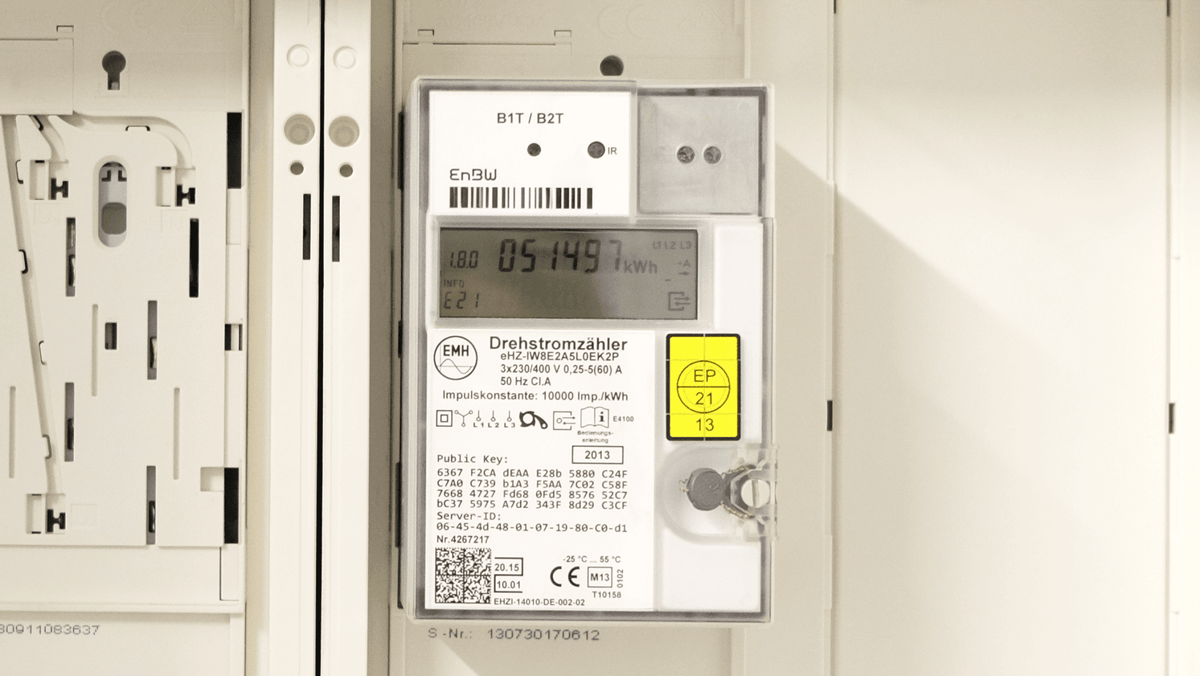
- 1.8.0 = total electricity consumption in kWh
- 2.8.0 = electricity fed in, e.g. for PV systems
- 16.7.0 = current power
If you are still unsure what these values mean, you can find the corresponding explanation here:
👉 What does 1.8.0 mean on the electricity meter?
Cause 1: Your electricity meter only shows the standard display
Many digital electricity meters are set at the factory to display only a portion of the available information directly. This means that the meter generally works, but initially only shows the basic values on the display.
This primarily affects:
- reduced display without additional values
- automatic alternating display with limited data
- hidden values that must first be activated
So, if you see very little, it doesn't automatically mean that something is wrong.
Cause 2: Certain values are only visible after PIN entry
With many digital electricity meters, additional information is only displayed after the PIN has been entered on the electricity meter. This often includes precisely the values that are interesting for detailed analysis.
This can affect, for example:
- current power
- extended consumption values
- additional OBIS codes
So, if your meter only shows a limited display, the PIN is often the first thing to check.
👉 We explain how to enter the PIN on your electricity meter in this article.
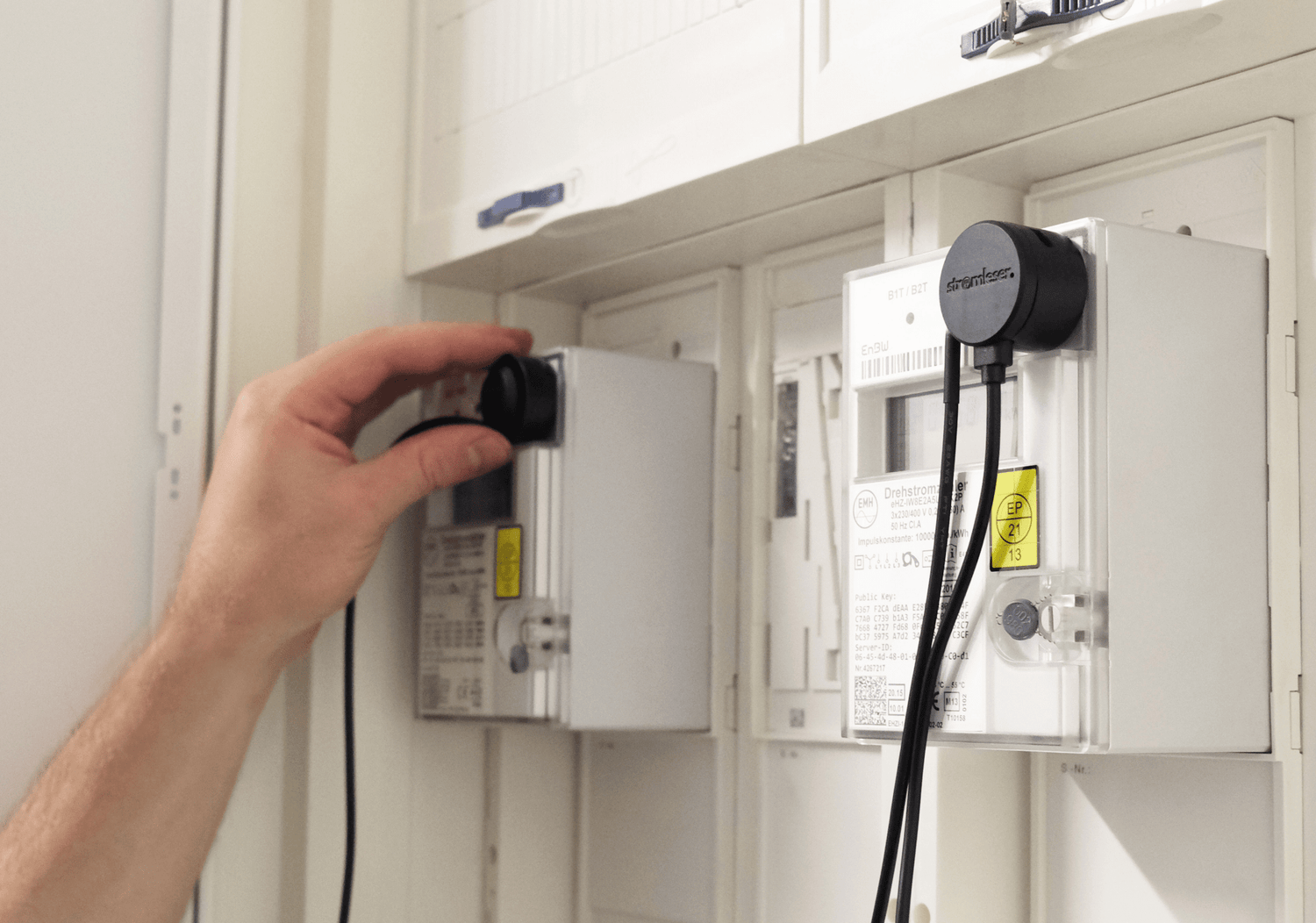
Cause 3: The reading head is not correctly positioned on the optical interface
If you want to read your electricity meter digitally, the position of the reading head is crucial. If it is not precisely positioned on the optical interface, no or incorrect values will be received.
Typical problems include:
- reading head slightly slipped
- incorrect position on the front of the meter
- insufficient contact with the optical interface
- reflections or unfavorable fit
Especially during initial setup, it is worthwhile to consciously check the position again.
If you want to understand the basics of digital reading, you can find the appropriate overview here:
👉 Reading smart meters: IR, D0 & SML explained simply
Cause 4: Not every visible meter reading can be automatically read out
A common misconception: just because a value is visible on the display, it doesn't automatically mean that it can be digitally read immediately.
Depending on the meter model, there can be differences in:
- activated interfaces
- displayed data
- available OBIS values
- behavior after PIN activation
Therefore, it is important not only to look at the display, but also at the technical compatibility of the meter.
👉 You can check whether your electricity meter is compatible here.
Cause 5: The values are measured locally, but not cleanly transmitted
Sometimes reading works on the meter itself, but the values do not appear as expected in the app or system. In this case, the cause is not the display, but the transmission.
Possible reasons:
- WLAN signal at the meter cabinet too weak
- connection interruptions
- setup not yet fully completed
- data not being properly forwarded
Especially with real-time data, a stable connection is important for the values to arrive reliably.
Cause 6: You are expecting the wrong value
It often seems as if the electricity meter is not showing any values, although the desired value is simply not the one you are looking for.
An example:
- you are looking for the current consumption
- but the meter is currently showing the total consumption at 1.8.0
Or vice versa:
- you want to read the meter reading
- but are looking at a momentary value instead of the total consumption
Therefore, it helps to first know exactly which value is relevant for your application.
Cause 7: The electricity meter is not defective – it just works differently than expected
Digital electricity meters often behave differently than old Ferraris meters. There is no longer a rotating disk, the display changes, and some values are only visible temporarily.
This quickly leads to the impression:
"Nothing is displayed"
or
"The meter is not providing any data"
In reality, everything is often in order – only the operating logic is different.
What you should check now specifically
If your electricity meter shows no or too few readings, it's best to go through these points in order:
- Is any value displayed at all?
- Does the display automatically switch between different values?
- Is the desired value only visible after PIN entry?
- Is the reading head precisely positioned on the optical interface?
- Is your meter fundamentally compatible?
- Are values recorded at the meter but not cleanly transmitted?
In most cases, you will find the cause relatively quickly this way.
Read electricity consumption automatically instead of just looking for individual values
Manually checking individual meter readings is often cumbersome – especially if the display changes or certain information is not permanently shown.
It is much simpler to read electricity consumption digitally and track it in real time. This way, you don't have to check directly at the meter every time to see which value is currently visible.
With a suitable reading solution, you can:
- automatically record consumption values
- detect changes more quickly
- better understand your electricity consumption
- process data directly
A plug-and-play solution like the stromleser.one is attached directly to the digital electricity meter and reads the data via the optical interface – without any intervention in the electrical installation.
👉 This turns simple reading into much more convenient energy monitoring.
Conclusion
If your digital electricity meter shows no readings or cannot be read as expected, there is usually no complicated malfunction behind it. Often, it's simple reasons such as a restricted display, missing PIN activation, a poorly placed reading head, or incorrect expectations of the displayed values.
Knowing the cause usually leads to a quick solution – and makes it much easier to understand and monitor your own electricity consumption.
FAQ
Why doesn't my electricity meter show all values?
Many digital electricity meters only display a portion of the available values by default. Further displays are often only activated after PIN entry.
Why can't I read my electricity meter?
Common causes include an unactivated display, a misplaced reading head, or a lack of meter compatibility.
Is my electricity meter defective if no values are displayed?
Not necessarily. In many cases, there is no malfunction, but only a limited display or an operating problem.
Which value is most important on the electricity meter?
For the classic meter reading, 1.8.0 is usually the most important value. It shows the total electricity consumption in kWh.
Can I read my electricity consumption automatically?
Yes, with a suitable reading solution, consumption can be recorded directly at the digital electricity meter and processed automatically.


Leave a comment
This site is protected by hCaptcha and the hCaptcha Privacy Policy and Terms of Service apply.