

Reading Smart Meters: IR, D0 & SML Explained Simply
Many households now have a digital electricity meter – often called a "Smart Meter." But how can you actually read the data? And what do terms like IR interface, D0, or SML mean?
In this article, we explain the most important interfaces in an easy-to-understand way – without technical frustration – and show you which solution is truly worthwhile for everyday use.
First off: Smart Meter or digital electricity meter – what's the difference?
In everyday life, the terms are often used interchangeably – however, technically there is a difference:
-
Digital electricity meter (modern measuring device, mME)
Displays your consumption digitally on the screen, usually has an optical interface (IR/D0), but is not automatically connected online. -
Smart Meter (intelligent metering system, iMSys)
Consists of a digital meter plus a Smart Meter Gateway that securely transmits the data to the grid operator.
Important:
For private reading via the optical interface, this difference usually doesn't matter – both types of meters can generally be read locally.
We explain the exact difference between a Ferraris meter, a digital electricity meter (modern metering device) and a real Smart Meter in detail here.
Briefly explained: How do you read a Smart Meter?
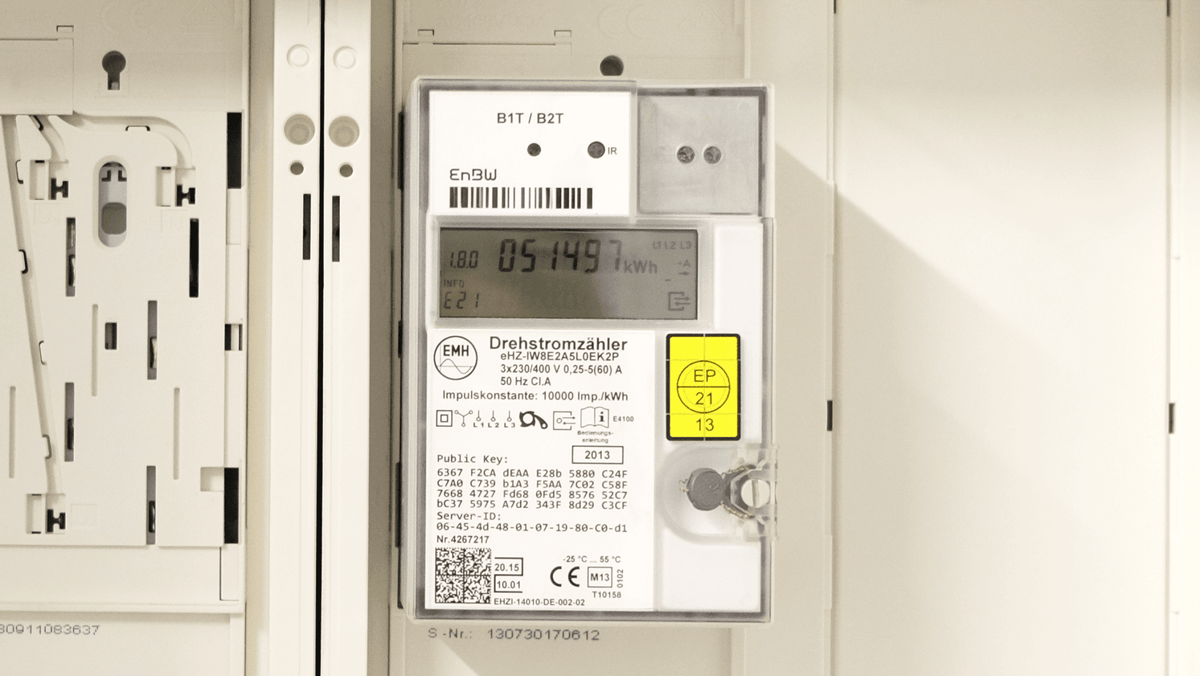
A digital electricity meter sends its consumption data via an optical interface (usually IR/D0).
With a suitable reading head, this data can be read out and, for example, transmitted via WLAN to an app or an energy monitoring system.
The result:
You see not only your meter reading – but your consumption in real time.
What does "reading a Smart Meter" actually mean?
Many confuse reading off with reading out:
- Reading off = noting down the meter reading from the display (e.g. 1.8.0 - what that means you can find out here)
- Reading out = Digital transmission of data in real time
When reading out, you receive:
- current power value (kW)
- total consumption (kWh)
- temporal profiles
- in some cases, feed-in values for PV systems
Note: Some values are only visible after the PIN has been entered on the electricity meter – we explain how this works here.

If you want to read your electricity meter easily, you will find the plug-and-play solution here.
The IR interface: Standard for digital electricity meters
Almost all modern digital electricity meters in Germany have an optical infrared interface (IR).
It is usually located at the front of the meter and is recognizable as a small round or rectangular area.
Via this interface:
- the meter sends data
- this data can be read wirelessly with a reading head
- no structural changes are necessary
Advantage:
✔ Simple
✔ Contactless
✔ No interventions in the electrical installation

D0 interface – what does it mean?
The so-called D0 interface describes the protocol through which many electricity meters send their data via the IR interface.
You can understand it like this:
- IR = the "physical connection"
- D0 = the "language" the meter speaks
For you this means:
If your meter has a D0 interface, you can usually read it out with a compatible reading head.
SML – the data format of modern meters
SML stands for "Smart Message Language."
This is a standardized data format used by many modern electricity meters.
This data includes, among other things:
- 1.8.0 → Total consumption
- 2.8.0 → Feed-in
- 16.7.0 → Current power
These so-called OBIS codes structure the consumption data.

Which solution is suitable for reading?
Basically, there are three options:
1. Manually via display
Simply note down the meter reading.
→ Good for annual billing
→ No real-time data
2. DIY solutions (e.g. open-source / self-built)
Technically possible, but:
- Setup often complex
- Network & MQTT knowledge required
- Not plug & play
3. Ready-made reading solution with WLAN
A reading head is placed on the IR interface and automatically transmits the data to the WLAN.
Advantages:
- Real-time consumption visible
- Analyze trends
- Export / further processing possible
- Integration into Smart Home
👉 If you want to read your digital electricity meter in an uncomplicated way, a plug-and-play solution like the stromleser.one is the easiest option.
Frequent questions about Smart Meter reading
Do I need the approval of my grid operator?
No – you are only accessing the optical interface in read-only mode.
Is that allowed?
Yes, as long as there is no manipulation of the meter.
Do I need WLAN in the meter cabinet?
For real-time transmission: yes. Alternatively, repeaters can help.
Why am I not getting any readings?
Possible reasons:
- PIN not entered (additionally PIN on "off")
- Interface not activated ("INF" on "on")
- Reading head incorrectly positioned
- WLAN signal too weak
Is my electricity meter compatible?
You can easily check this here.
Conclusion
Reading a Smart Meter is simpler than many people think.
The IR interface is standard today, D0 describes the transmission protocol, and SML structures the data:
| Term | Meaning | Relevance for you |
|---|---|---|
| IR interface | Optical data transmission | Standard for digital meters |
| D0 | Communication protocol | Transmits consumption data |
| SML | Data format | Structure of measured values |
| OBIS | Identification system | Identifies consumption values |
With the right solution, you can:
- see your electricity consumption in real time
- identify power guzzlers
- better understand your energy costs
And all this without any intervention in the electrical installation.



Leave a comment
This site is protected by hCaptcha and the hCaptcha Privacy Policy and Terms of Service apply.